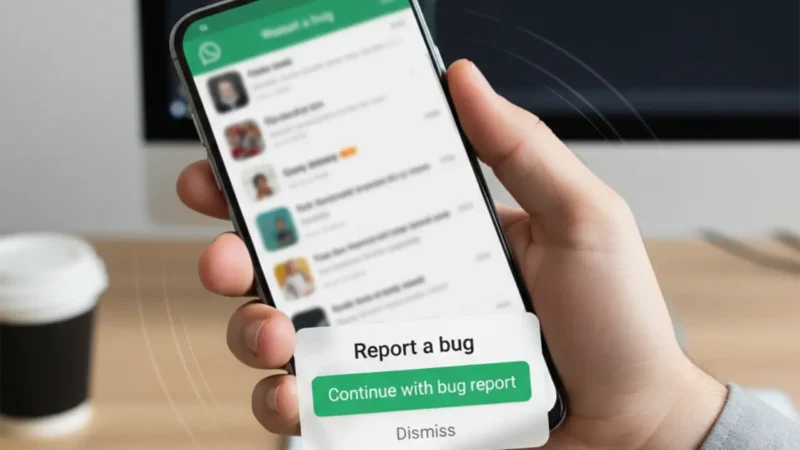
You will soon see a new and very useful feature in the latest WhatsApp beta for Android 2.25.34.6. This update has started rolling out through the Google Play Beta Program, and many users have already spotted a new shortcut for reporting bugs. For now, this feature is available only to some beta testers, but it will reach more users in the coming weeks. Along with this, WhatsApp is also improving the entire bug reporting system so that users can share issues more quickly. This will help the team understand problems faster and keep the app more stable.
In this article, we will discuss WhatsApp beta for Android 2.25.34.6. WhatsApp adds new features every month, and the chances of small bugs also increase, so this new reporting shortcut is very important.
Shake Your Phone to Report Bugs in WhatsApp beta for Android 2.25.34.6
The biggest change in this update is the “shake phone to report bug” feature. In simple words, whenever you see a glitch or something unusual inside WhatsApp, you can just shake your device. Right after that, a bottom pop-up will appear asking you if you want to continue with the bug report. If you tap “continue,” WhatsApp will automatically take a screenshot of your current screen and open a form where you can explain what happened. This makes the process very fast because earlier you had to go to Settings > Help > Contact Us, which many people ignored. After all, it took time.
Along with this, the screenshot is optional. If you do not want to send it, you can remove it before submitting the form. So, the feature is not only quick but also fully in your control.
Redesigned Bug Reporting System
WhatsApp started improving its bug reporting system earlier with the iOS 25.23.10.71 update. In that update, WhatsApp added direct entry points for reporting bugs inside the Help section and also in the main Settings page. For now, the Android WhatsApp beta for Android 2.25.34.6 continues that improvement by adding the shake shortcut. It also shows that WhatsApp is seriously focusing on user feedback and trying to make this process smoother. Now users do not need to scroll to the bottom of the Help Center to find options. Everything is right in front of them, and everything is easy to access.
How the Shake Feature Works Inside the App
The shake feature works in almost every section of WhatsApp. So if you are checking channels, browsing chats, watching status, or even navigating through media, you can instantly trigger bug reporting. Once you shake your device, a small pop-up appears from the bottom. If you say yes, the app takes a temporary screenshot and stores it only for the bug report. It does not save it to your phone gallery. After that, the bug reporting form opens in WhatsApp beta for Android 2.25.34.6 .
You can write what problem you faced, where it happened, and when it happened. This small explanation helps WhatsApp understand and fix issues much faster. For example, if the message send button freezes, or a channel is not loading properly, the screenshot and details help the developers find the exact root cause.
Also read
How to Create a Minimal Android Home Screen Setup That Reduces Distractions
Google Play Will Soon Warn You If an App Drains Your Battery Fast
Option to Disable the Shake Shortcut
Some users may not like the shake gesture because it may get triggered accidentally. For those users, WhatsApp has added a simple disable option. Inside the bug reporting settings, you can turn off the shake-to-report feature anytime. This way, you can use WhatsApp as usual without worrying about accidental triggers. For now, this option makes the feature more flexible because not everyone likes gesture-based shortcuts. With this control, every user can decide how they want to interact with WhatsApp.
Why This WhatsApp beta for Android 2.25.34.6 Is Helpful
This new shake shortcut may look very small, but it is extremely helpful. Many users notice bugs but never report them because the process takes time. Now they can send feedback within seconds. Along with this, the screenshot helps developers understand the issue more clearly. WhatsApp can quickly find which device, which version, or which part of the app is showing the problem. This helps them fix issues much faster.
It also encourages users to report problems instantly, instead of ignoring them or forgetting about them later. As a result, overall app quality will improve over time.

Availability for Beta Testers
For now, the shake-to-report feature is available only to some beta testers on WhatsApp beta for Android 2.25.34.6. WhatsApp will expand this rollout slowly, so more users will start seeing it in the coming days. Some older beta versions may also show this option because WhatsApp sometimes tests features server-side. But officially, WhatsApp beta for Android 2.25.34.6 is confirmed as compatible.
Article summary
WhatsApp beta for Android 2.25.34.6 brings a new shortcut that lets you report bugs just by shaking your phone. When you shake the device, a pop-up appears and WhatsApp automatically takes a screenshot for the report. You can remove it if you want. The feature works across different sections, protects privacy, and can also be turned off anytime. For now, it is rolling out only to some beta testers.
Also read
Best Ways to Use Your Android Phone as a Wireless Mouse & Keyboard for PC
Gemini for TV is Rolling Out to Google TV Streamer: Your TV Just Got Smarter in 2025