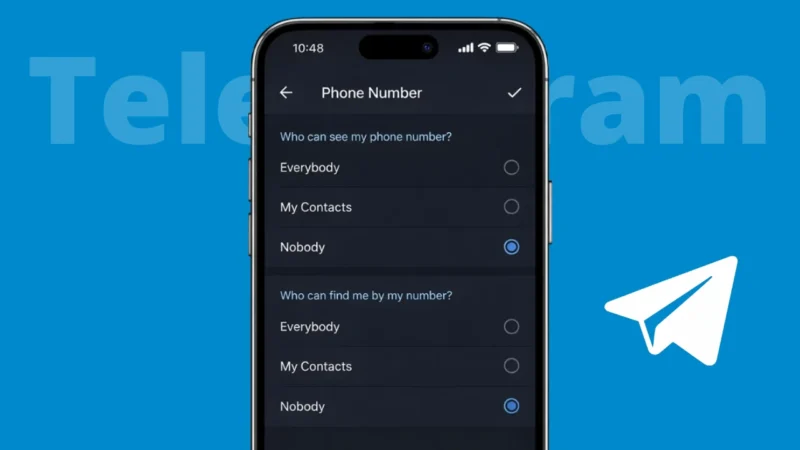
Telegram is popular for its privacy focused features, but many users do not realize that their phone number may still be visible to others by default. If you want more control over who can see your number, Telegram provides simple privacy settings to hide it completely or limit visibility.
This guide explains how to hide your phone number on Telegram, how the settings work, and what happens after you change them.
Also read: 3 Ways to Know How Much Time You Spend on YouTube
Why Your Phone Number Is Visible on Telegram
Telegram uses your phone number to create and verify your account. By default, people who already have your number saved in their contacts may be able to see it on Telegram.
However, Telegram allows you to control:
- Who can see your phone number
- Who can find you using your number
Both settings are important for privacy.
How to Hide Your Phone Number on Telegram
You can hide your number using Telegram’s built-in privacy controls. The steps are similar on Android, iPhone, and desktop.
Steps to Hide Phone Number
- Open the Telegram app
- Go to Settings
- Tap Privacy and Security
- Select Phone Number
Here you will see two important options.
Also read: How to Set a Custom Profile Picture on Netflix
Set Who Can See Your Phone Number
Under Who can see my phone number, choose one of the following:
- Everybody – Anyone can see your number
- My Contacts – Only saved contacts can see it
- Nobody – Your number is hidden from everyone
To fully hide your number, select Nobody.
Control Who Can Find You by Your Number
Below that, you will see Who can find me by my number.
Options include:
- Everybody
- My Contacts
If you want maximum privacy, select My Contacts. This prevents strangers from finding your profile using your phone number.
Also read: How to Save, Access, or Delete Drafts on Instagram
Add Exceptions if Needed
Telegram also lets you add exceptions:
- Always allow specific contacts
- Never allow specific contacts
This is useful if you want to share your number only with trusted people.
What Happens After You Hide Your Phone Number
Once you hide your number:
- New users will not see your phone number
- Existing chats remain unchanged
- Your username still works for messaging
- People can contact you via username or shared groups
Your Telegram account continues to work normally.
Also read: How to Delete WhatsApp Call History on Android and iOS Devices
Can People Still Contact You Without Your Number
Yes. If you have a Telegram username:
- Anyone can message you using your username
- Your phone number remains hidden
- You can change or remove your username anytime
Using a username is the safest way to stay reachable without sharing your number.
Things to Keep in Mind
- Hiding your number does not delete your account
- Contacts who already saved your number may still recognize you
- You can change privacy settings anytime
- These settings apply across all devices
Also read: How to Use Message Reactions in Telegram
Final Thoughts
Telegram gives users strong control over their privacy, including the ability to hide phone numbers completely. By adjusting a few simple settings, you can decide exactly who sees your number and who can find you. If privacy matters to you, hiding your phone number and using a username is a smart and safe choice.