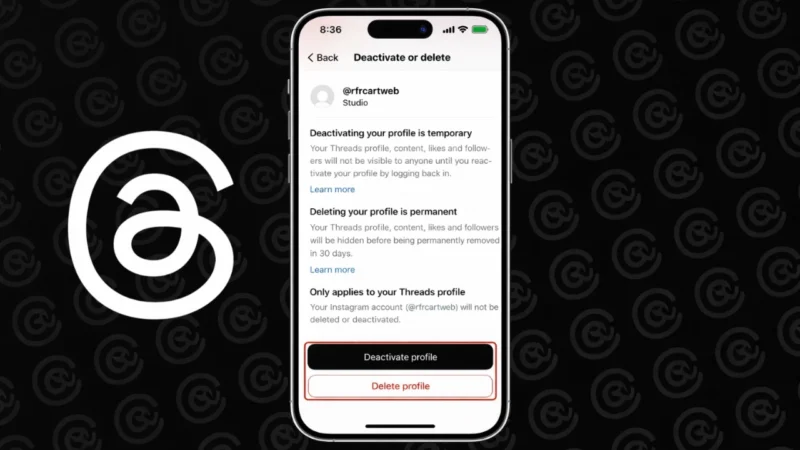
Threads is closely connected to Instagram, which often confuses users when they want to remove their Threads account. Many people think deleting Threads will also delete Instagram, but that is not true anymore.
In this guide, you will learn the safe and official way to delete your Threads account without affecting your Instagram profile.
Also read: How to Turn Off Location Sharing on Snapchat Using Ghost Mode
Can You Delete Threads Without Deleting Instagram
Yes, you can delete your Threads account separately.
Earlier, Threads accounts were tightly linked to Instagram, but now Meta allows users to delete Threads independently. This means:
- Your Instagram account will remain active
- Your followers and posts on Instagram will not be affected
- Only your Threads data will be removed
What Happens When You Delete Threads Account
Before deleting, you should understand what will happen:
- Your Threads profile will be permanently deleted
- All posts, replies, and data will be removed
- Your username may become unavailable
- This action cannot be undone after confirmation
If you are unsure, you can also deactivate instead of deleting.
How to Delete Threads Account Without Deleting Instagram
Follow these steps carefully:
Step 1: Open Threads App
Open the Threads app on your phone.
Step 2: Go to Your Profile
Tap your profile icon at the bottom right corner.
Step 3: Open Settings
Tap the two-line menu or settings icon.
Step 4: Go to Account Section
Find and tap on Account.
Step 5: Select Delete or Deactivate Profile
Tap on Delete Profile or similar option.
Step 6: Confirm Deletion
Follow the on-screen instructions and confirm your action.
Once confirmed, your Threads account will be scheduled for deletion.
Alternative: Deactivate Threads Account
If you do not want to permanently delete your account, you can choose deactivation.
Steps to Deactivate:
- Open Threads app
- Go to profile
- Open settings
- Tap Account
- Select Deactivate Profile
What Deactivation Does:
- Your profile becomes hidden
- Posts and activity are not visible
- You can reactivate anytime by logging in
Important Things to Keep in Mind
- Deleting Threads does not delete Instagram
- You may need to wait a few days for complete removal
- Make sure to back up any important content before deleting
- App updates may slightly change settings location
Why People Delete Threads Account
Some common reasons include:
- Privacy concerns
- Less usage of the app
- Too many linked platforms
- Want to reduce social media usage
Also read: How to Use Grammarly to Improve Your Writing (Beginner Friendly Guide)
Final Thoughts
Deleting your Threads account without affecting Instagram is now simple and completely possible. Just follow the official steps inside the app settings and confirm your choice.
If you are unsure, start with deactivation first. It gives you the flexibility to come back anytime without losing your data.