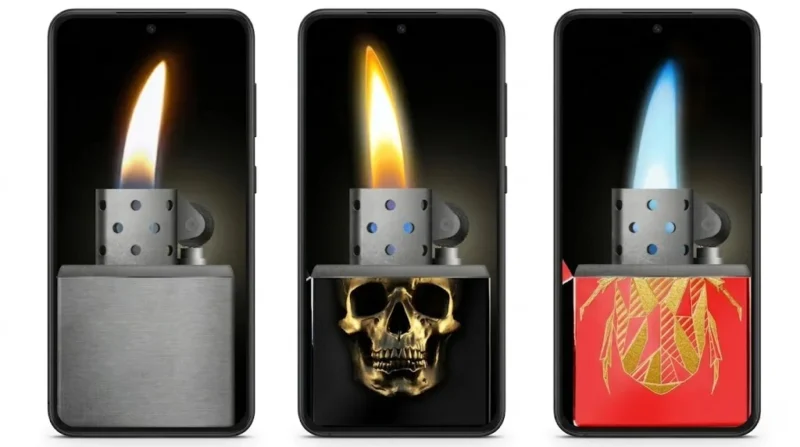
Smartphone entertainment apps are no longer limited to games and social media. Many users now enjoy fun simulator apps that create unique visual experiences directly on their phones. One category that has become surprisingly popular is lighter simulator apps.
Among them, apps with realistic flames, concert mode, and animated effects are attracting huge attention from Android users, especially content creators and music lovers.
If you enjoy concert vibes, cool animations, or simply want a fun app to show friends, a realistic lighter simulator can deliver a surprisingly entertaining experience.
Also read: Best 3D Live Wallpaper Apps for Android With Clock, Battery & Charging Effects
What Is a Lighter Simulator App?
A lighter simulator app turns your smartphone into a virtual lighter with animated flames and realistic sound effects.
Instead of using a real lighter, users can:
- Tap the screen to ignite flames
- Shake the phone to move the fire
- Use concert-style light effects
- Customize flame colors and lighter themes
These apps are mainly designed for entertainment and visual fun.
Why Lighter Simulator Apps Are Becoming Popular
The popularity of lighter simulator apps has increased because they combine:
- Realistic visuals
- Interactive animations
- Music and concert vibes
- Social media-friendly effects
Many people now use smartphones instead of real lighters during concerts, parties, or music events.
The app creates a safer and more modern alternative while still giving the same visual feeling.
Concert Mode Makes the Experience More Fun
One of the most interesting features is Concert Mode.
When activated:
- The flame reacts to movement
- The screen glows realistically
- Fire animations look brighter in dark environments
- The experience feels more immersive during music playback
This creates a concert-like atmosphere directly from the phone screen.
Realistic Flame Effects
Modern lighter simulator apps use advanced animations to create realistic fire effects.
Features often include:
- HD flame graphics
- Realistic lighter sounds
- Smooth fire motion
- Shake detection technology
- Metal lighter-style designs
When users tilt or shake the device, the flame moves naturally to simulate real fire movement.
Multiple Themes and Flame Colors
Customization is another major reason people enjoy these apps.
Users can choose from:
- Gold lighter designs
- Neon flame effects
- Blue fire themes
- Retro lighter styles
- Dark mode lighter interfaces
Many apps also support dozens of flame colors and lighter variations.
Lightweight and Smooth Performance
Unlike some heavy animation apps, many lighter simulators are optimized for:
- Low RAM devices
- Budget Android phones
- Smooth animations
- Faster loading times
- Lower battery usage
That makes them accessible even on older Android devices.
Great for Social Media Content
These apps are especially popular among:
- TikTok creators
- YouTubers
- Instagram Reel creators
- Short video editors
People often use lighter effects for:
- Concert-style edits
- Romantic videos
- Cinematic transitions
- Music-themed content
The visual effects can make short videos look more engaging.
Simple User Interface
Most lighter simulator apps are designed to be beginner-friendly.
Typical usage steps:
- Install the app
- Open it
- Select a lighter theme
- Tap the screen to ignite flames
- Shake the phone for movement effects
There are usually no complicated settings involved.
Why Some Lighter Simulator Apps Stand Out
Not every lighter simulator app feels realistic.
The better apps usually offer:
- Smooth animations
- High-quality sound effects
- Better customization
- Responsive controls
- More realistic flame behavior
A poorly optimized app quickly feels fake or repetitive.
Is It Safe to Use?
Generally, lighter simulator apps are safe if downloaded from trusted sources like the Google Play Store.
Before installing:
- Check developer reviews
- Verify app permissions
- Read user ratings
- Avoid suspicious APK downloads
This helps reduce privacy and security risks.
Who Will Enjoy These Apps?
These apps are ideal for:
- Music lovers
- Concert fans
- Android customization users
- Content creators
- Users looking for fun entertainment apps
People who enjoy visually interactive apps will likely enjoy the experience.
Download the App
One popular app users can try is:
Lighter Simulator Concert Mode
The app includes:
- Realistic lighter effects
- Concert mode animations
- Multiple flame colors
- HD visuals
- Smooth motion effects
Optional Download Link:
Lighter Simulator Concert Mode
Important Reality Check
These apps are fun, but they are still novelty entertainment apps.
Users should not expect:
- Real utility features
- Professional-level graphics on all devices
- Completely ad-free experiences in free versions
Also, leaving animations running for long periods can still consume battery because the screen remains active continuously.
Also read: Unlock Your Phone with Just Your Voice: A Smart Way to Use Voice Lock App
Final Thoughts
Lighter simulator apps bring a simple but entertaining experience to Android devices. Features like realistic flames, concert mode, and customizable designs make them surprisingly enjoyable for parties, music events, and social media content creation.
But here’s the reality:
The best simulator apps are the ones that balance visual quality with smooth performance. Overloaded effects and excessive ads can ruin the experience quickly. Choosing a lightweight, well-designed app matters far more than simply picking the app with the flashiest screenshots.
If you enjoy unique Android entertainment apps, trying a realistic lighter simulator is definitely worth it.