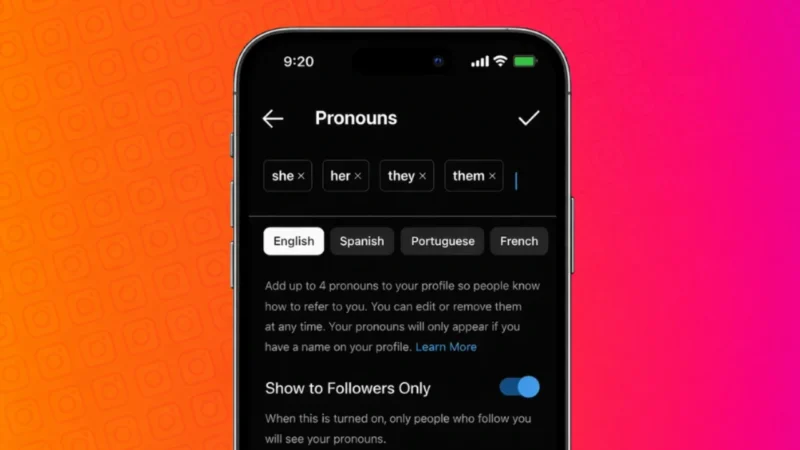
Instagram allows users to add pronouns to their profiles so others can address them correctly. This feature is optional and designed to help people express their identity in a simple and respectful way. If you want to add, edit, or remove pronouns on your Instagram profile, this guide explains everything step by step using the official method.
Also read: How to Save, Access, or Delete Drafts on Instagram
What Are Pronouns on Instagram
Pronouns are short words like she, he, they, or custom options that appear on your profile. They are displayed below your name and are visible to others depending on your privacy settings.
Instagram introduced this feature to give users more control over how they are identified, without forcing anyone to use it.
Who Can Add Pronouns on Instagram
Pronouns are available in many countries, but not everywhere. If the option is available in your region, you will see it directly in your profile settings. If you do not see it, Instagram may not have rolled it out to your account yet.
The feature works on both Android and iPhone using the latest version of the Instagram app.
Also read: How to Unsync Contacts From Instagram (Step-by-Step Guide)
How to Add Pronouns on Instagram Profile
Follow these steps carefully:
- Open the Instagram app on your phone
- Go to your profile
- Tap Edit profile
- Look for the Pronouns option
- Tap on it
- Search and select up to four pronouns
- Choose who can see your pronouns
- Tap Done to save changes
Your selected pronouns will now appear on your profile under your name.
How to Change or Remove Pronouns on Instagram
If you want to update or remove pronouns later, the process is simple.
To change pronouns:
- Go to Edit profile
- Tap Pronouns
- Remove existing ones and select new pronouns
- Save changes
To remove pronouns completely:
- Open Edit profile
- Tap Pronouns
- Remove all selected pronouns
- Tap Done
Your profile will no longer display pronouns.
Also read: How to Archive Instagram Posts Without Deleting Them
Who Can See Your Pronouns
Instagram gives you control over visibility. You can choose:
- Everyone
- Only people who follow you
This helps maintain privacy while still using the feature comfortably.
Why You Might Want to Add Pronouns
People choose to add pronouns for different reasons, such as:
- Clear communication
- Avoiding confusion
- Personal expression
- Supporting inclusive interactions
Since it is optional, you should only use it if it feels right for you.
Also read: How to Tag Someone on Instagram Story After Posting
What to Do If You Do Not See the Pronouns Option
If the pronouns option is missing:
- Update Instagram to the latest version
- Log out and log back in
- Check if the feature is available in your country
- Wait for a gradual rollout
Instagram releases features in phases, so availability can vary.
Final Thoughts
Adding pronouns on your Instagram profile is a personal choice and completely optional. The feature is easy to use, reversible, and designed to respect user privacy. If the option is available to you, you can enable it in just a few taps and adjust visibility anytime.
If you prefer not to use pronouns, Instagram does not require it, and your account works the same without it.
Also read: How to Unsend or Delete Messages on Instagram (Step-by-Step Guide)