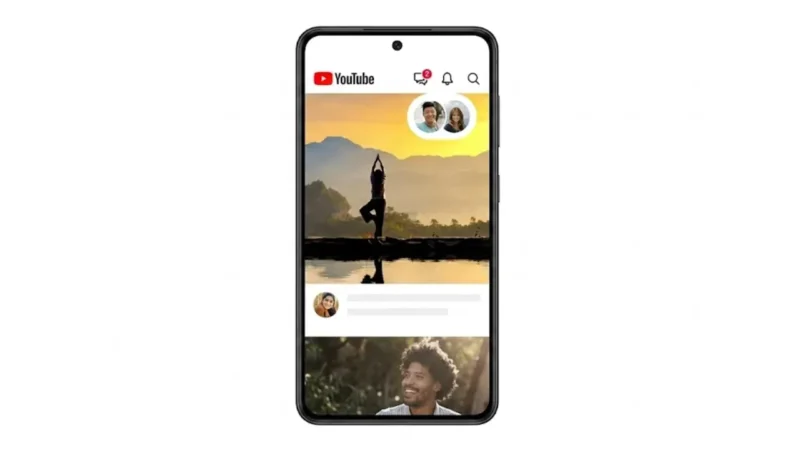
YouTube Expands In-App Video Sharing and Chat Feature to More Countries

YouTube is expanding its in-app messaging and video-sharing feature to more users worldwide, allowing people to share videos and chat without leaving the platform. The feature, which was previously available only to a limited group of users during testing, is now rolling out to dozens of countries.

The update aims to make sharing content more convenient by letting users discuss videos directly inside the YouTube app instead of relying on third-party messaging services.

Also read: Running Out of Storage? Here’s How Android Can Automatically Free Up Space Without Deleting Your Apps

YouTube’s Built-In Chat Feature Reaches More Regions

After an initial testing phase in select markets, YouTube has announced a wider rollout of its in-app messaging functionality.

The feature is now becoming available in around 40 countries, including:

  • United States
  • United Kingdom
  • Brazil
  • Italy
  • Singapore
  • And several other global markets

Previously, the feature was only being tested with users in a small number of countries.

The expansion signals YouTube’s continued effort to keep video discovery, sharing, and conversations within its own ecosystem.

What Is YouTube’s In-App Video Sharing Feature?

The feature allows users to share videos directly with friends and contacts through the YouTube mobile app.

Instead of copying a video link and sending it through another messaging platform, users can start conversations inside YouTube itself.

People can:

  • Share regular videos
  • Send YouTube Shorts
  • Share live streams
  • React to videos in real time
  • Discuss content within private conversations

The goal is to create a more interactive viewing experience where conversations happen alongside the content being shared.

Why YouTube Is Expanding This Feature

Video sharing is one of the biggest drivers of engagement on YouTube.

Traditionally, users have relied on external apps such as messaging platforms and social networks to share content with friends and family.

With the new feature, YouTube is trying to make the process simpler by keeping both video sharing and conversations inside a single app.

This could help users:

  • Share content faster
  • Respond to videos instantly
  • Discover new content through friends
  • Reduce the need to switch between apps

Who Can Use the Feature?

According to YouTube, the feature is available to users who:

  • Are at least 18 years old
  • Have a signed-in YouTube account
  • Use the latest version of the YouTube mobile app

Users who meet these requirements should gradually see the feature appear as the rollout continues.

How to Share a Video Directly on YouTube

Sharing a video through YouTube’s built-in messaging feature is straightforward.

Step 1: Open the YouTube App

Launch the YouTube app on your smartphone.

Step 2: Find a Video

Open the video you want to share.

Step 3: Tap the Share Button

Select the Share option located below the video player.

Step 4: Choose a Contact

Pick a contact from the available list or send an invitation to someone who is not already connected through YouTube messaging.

Step 5: Start the Conversation

Once shared, both users can discuss the video directly inside the app.

How to Invite Someone to Chat on YouTube

Users can also start new conversations by sending chat invitations.

Follow These Steps:

  1. Open the YouTube app
  2. Tap the Messages section
  3. Select Invite to Chat
  4. Share the invitation link

The recipient can then choose whether to accept or decline the invitation.

If accepted, both users can exchange messages and share videos directly on YouTube.

Invitation Links Have an Expiration Date

YouTube notes that chat invitation links are not permanent.

Invitation links automatically expire after seven days if they are not accepted.

This helps improve security and prevents old invitation links from remaining active indefinitely.

Why This Update Matters

The expansion of YouTube’s messaging feature reflects a growing trend among social and content platforms to combine communication with content consumption.

Rather than using separate apps for watching videos and discussing them, users can now do both within the same experience.

For creators, this may also help increase engagement as viewers can easily share content with friends and discuss it instantly.

Final Thoughts

YouTube’s expanded in-app chat and video-sharing feature could make sharing content more convenient for millions of users worldwide. By allowing people to exchange messages, react to videos, and discuss content without leaving the platform, YouTube is creating a more connected viewing experience.

As the rollout continues across more countries, the feature may encourage users to spend more time engaging with content and interacting with friends directly within the YouTube app.

YouTube Expands In-App Video Sharing and Chat Feature to More Countries

YouTube is expanding its in-app messaging and video-sharing feature to more users worldwide, allowing people to share videos and chat without leaving the platform. The feature, which was previously available only to a limited group of users during testing, is now rolling out to dozens of countries.

The update aims to make sharing content more convenient by letting users discuss videos directly inside the YouTube app instead of relying on third-party messaging services.

YouTube’s Built-In Chat Feature Reaches More Regions

After an initial testing phase in select markets, YouTube has announced a wider rollout of its in-app messaging functionality.

The feature is now becoming available in around 40 countries, including:

  • United States
  • United Kingdom
  • Brazil
  • Italy
  • Singapore
  • And several other global markets

Previously, the feature was only being tested with users in a small number of countries.

The expansion signals YouTube’s continued effort to keep video discovery, sharing, and conversations within its own ecosystem.

What Is YouTube’s In-App Video Sharing Feature?

The feature allows users to share videos directly with friends and contacts through the YouTube mobile app.

Instead of copying a video link and sending it through another messaging platform, users can start conversations inside YouTube itself.

People can:

  • Share regular videos
  • Send YouTube Shorts
  • Share live streams
  • React to videos in real time
  • Discuss content within private conversations

The goal is to create a more interactive viewing experience where conversations happen alongside the content being shared.

Why YouTube Is Expanding This Feature

Video sharing is one of the biggest drivers of engagement on YouTube.

Traditionally, users have relied on external apps such as messaging platforms and social networks to share content with friends and family.

With the new feature, YouTube is trying to make the process simpler by keeping both video sharing and conversations inside a single app.

This could help users:

  • Share content faster
  • Respond to videos instantly
  • Discover new content through friends
  • Reduce the need to switch between apps

Who Can Use the Feature?

According to YouTube, the feature is available to users who:

  • Are at least 18 years old
  • Have a signed-in YouTube account
  • Use the latest version of the YouTube mobile app

Users who meet these requirements should gradually see the feature appear as the rollout continues.

How to Share a Video Directly on YouTube

Sharing a video through YouTube’s built-in messaging feature is straightforward.

Step 1: Open the YouTube App

Launch the YouTube app on your smartphone.

Step 2: Find a Video

Open the video you want to share.

Step 3: Tap the Share Button

Select the Share option located below the video player.

Step 4: Choose a Contact

Pick a contact from the available list or send an invitation to someone who is not already connected through YouTube messaging.

Step 5: Start the Conversation

Once shared, both users can discuss the video directly inside the app.

How to Invite Someone to Chat on YouTube

Users can also start new conversations by sending chat invitations.

Follow These Steps:

  1. Open the YouTube app
  2. Tap the Messages section
  3. Select Invite to Chat
  4. Share the invitation link

The recipient can then choose whether to accept or decline the invitation.

If accepted, both users can exchange messages and share videos directly on YouTube.

Invitation Links Have an Expiration Date

YouTube notes that chat invitation links are not permanent.

Invitation links automatically expire after seven days if they are not accepted.

This helps improve security and prevents old invitation links from remaining active indefinitely.

Why This Update Matters

The expansion of YouTube’s messaging feature reflects a growing trend among social and content platforms to combine communication with content consumption.

Rather than using separate apps for watching videos and discussing them, users can now do both within the same experience.

For creators, this may also help increase engagement as viewers can easily share content with friends and discuss it instantly.

Also read: Meta Unveils Facebook Plus, Instagram Plus and WhatsApp Plus Subscription Plans With Exclusive Features

Final Thoughts

YouTube’s expanded in-app chat and video-sharing feature could make sharing content more convenient for millions of users worldwide. By allowing people to exchange messages, react to videos, and discuss content without leaving the platform, YouTube is creating a more connected viewing experience.

As the rollout continues across more countries, the feature may encourage users to spend more time engaging with content and interacting with friends directly within the YouTube app.

Leave a Comment