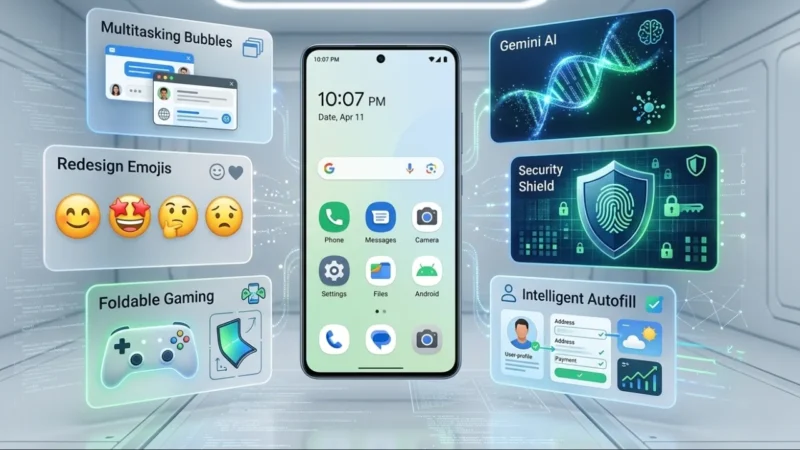
Google has officially begun rolling out Android 17 to eligible Pixel devices, introducing a range of new features focused on multitasking, security, productivity, and user experience. While some of the most anticipated AI-powered capabilities announced at Google I/O 2026 are still scheduled to arrive later this year, the initial release already brings several meaningful improvements for Android users.
The latest version of Android reflects Google’s broader vision of transforming the operating system into a smarter, more intelligent platform powered by Gemini AI. From enhanced multitasking tools to stronger privacy controls, Android 17 lays the foundation for a more personalized mobile experience.
Also read: Instagram Introduces Multiple Captions for Carousel Posts, Giving Creators More Storytelling Control
Android 17 Begins Rolling Out to Pixel Devices
The rollout has started for supported Pixel smartphones, giving users early access to the newest version of Android before many other manufacturers release their own updates. Google has accelerated its software release cycle in recent years, allowing Pixel owners to experience major platform upgrades sooner than expected.
Although several advanced Gemini-powered features will arrive through future updates, Android 17 already introduces notable changes that improve daily usability.
New App Bubbles Make Multitasking Easier
One of the standout additions in Android 17 is expanded support for app bubbles.
Previously limited mainly to messaging applications, the bubble feature can now be used with almost any app. Users can simply long-press an application icon, activate the bubble option, and create a floating shortcut that remains accessible across the system.
Tapping a bubble opens the app in a compact floating window, making it easier to switch between tasks without constantly opening and closing applications. Foldable devices will also receive a dedicated bubble dock for improved multitasking.
Foldable Devices Receive Gaming Enhancements
Google is placing greater emphasis on foldable smartphones with Android 17.
The update introduces new gaming layouts optimized for foldable screens, allowing users to split the display between gameplay and virtual controls. This setup reduces the need for external controllers while making mobile gaming more convenient on larger foldable displays.
Android 17 also improves controller customization and memory management, helping reduce frame drops and improve overall gaming performance.
Stronger Security and Privacy Controls
Security remains a major focus in Android 17.
Users can now grant temporary access to precise location data instead of providing permanent permissions. The update also introduces more granular sharing controls, allowing information to be shared only with selected contacts.
Google has enhanced device protection features as well. The Find Hub’s “Mark as Lost” option now requires biometric verification in certain situations, making it harder for unauthorized users to access a lost device.
Additionally, Android 17 strengthens scam detection, threat protection, and passcode security through longer lockout periods after repeated failed attempts.
Easier Creation of Reaction Videos
Content creators and social media users will benefit from a new screen recording enhancement.
Android 17 allows users to record both their screen activity and front-facing camera simultaneously. This makes creating reaction videos significantly easier without requiring multiple apps or complex editing workflows.
The feature is expected to be particularly useful for creators sharing gaming clips, tutorials, reviews, and social media reactions.
Gemini Intelligence Arriving Later This Year
While Android 17 is already available, Google’s biggest AI innovations are scheduled for release in upcoming updates.
At the center of these plans is Gemini Intelligence, a system designed to help users complete tasks more efficiently through advanced AI assistance.
Google envisions Gemini as more than a chatbot. Instead, it will act as a personal assistant capable of understanding context, automating tasks, and helping users manage everyday activities across their devices.
Intelligent Autofill Gets Smarter
Android’s autofill functionality is receiving a major AI upgrade.
Future updates will allow Gemini to automatically complete complex forms containing information such as passport details, license numbers, and other sensitive data. The goal is to reduce manual typing while maintaining security and convenience.
Create Custom Widgets With AI
Android 17 will also introduce an AI-powered widget creation tool.
Users will be able to ask Gemini to generate personalized widgets based on their preferences and interests. For example, a widget could automatically display weekly meal ideas, reminders, schedules, or frequently requested information directly on the home screen.
This feature aims to make widgets more useful and adaptive than traditional static designs.
Refreshed Emoji and Material Expressive Design
Google is redesigning more than 4,000 emoji with enhanced detail and a more realistic appearance.
The updated emoji collection will gradually roll out across Gboard, Gmail, YouTube, and other Google services later this year.
Android 17 also expands Google’s Material Expressive design language with smoother animations, improved visual feedback, and subtle interface enhancements that help users better understand what Gemini is doing in the background.
Chrome Auto Browse and Task Automation
Another upcoming feature is Chrome Auto Browse, which will allow Gemini to perform online tasks on behalf of users.
Google says the tool will eventually help with activities such as finding products, booking appointments, planning events, and gathering information automatically.
This represents a major step toward Google’s vision of AI-powered task automation.
Better Device Switching and Instagram Enhancements
Android 17 will simplify the process of switching from another device by transferring home screen layouts, shortcuts, and saved passwords during setup.
Google is also partnering with Meta to improve Instagram on Android. Upcoming updates will add support for Ultra HDR photos and videos, native stabilization, enhanced night mode, and exclusive editing tools designed specifically for Android devices.
Expanded Quick Share and Smarter Gboard
Quick Share continues to evolve with broader device compatibility and easier file sharing options.
Meanwhile, Gboard receives a new AI-powered speech-to-text feature called Rambler. It can better understand conversational context, edit content while dictating, and organize information more naturally without requiring precise commands.
New Digital Wellbeing Feature: Pause Point
Android 17 introduces Pause Point, a Digital Wellbeing feature designed to reduce distractions.
Users can mark specific apps as distracting. Before opening those apps, Android will present alternatives such as breathing exercises, reminders, or activity suggestions to encourage healthier device usage habits.
Also read: Reliance’s Jio Platforms Files for Massive IPO, Could Raise Around $4 Billion
Final Thoughts
Android 17 marks another major step in Google’s effort to combine traditional mobile features with advanced artificial intelligence. While the first wave of updates focuses on multitasking, gaming, privacy, and usability improvements, the biggest changes are still on the horizon.
With Gemini Intelligence, AI-powered automation, smarter widgets, advanced autofill, and enhanced app experiences arriving later this year, Android 17 could become one of Google’s most ambitious software releases yet.