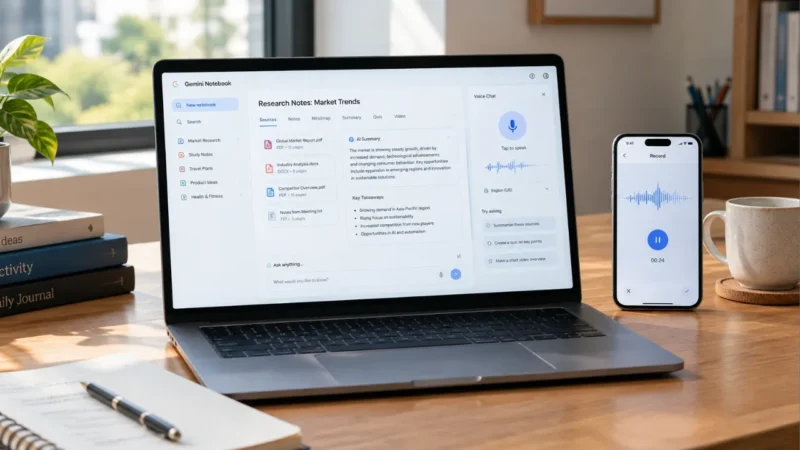
Google is giving Gemini Notebook a major upgrade, adding several new AI features that could make the platform much more useful for students, researchers and anyone who works with large amounts of information.
The latest update introduces real-time voice conversations, an audio recorder for mobile users, interactive learning tools, new quiz formats and short video overviews.
The changes are part of Google’s wider push to make Gemini Notebook more than a traditional document and research assistant.
Here’s a closer look at what’s new.
Also read: Samsung One UI 9 Stable Update Is Coming Soon: Galaxy Phones That Could Get It First
Gemini Notebook Can Now Talk to You
One of the biggest additions is real-time voice conversation.
Instead of typing every question, users can now have a spoken conversation with their notebook and ask questions about the information they have added.
You can ask Gemini to explain a topic, clarify something from your notes or help you understand a complicated section.
The conversation is designed to stay connected to the sources inside the notebook, making it different from simply having a general conversation with an AI chatbot.
Google says the voice experience will support nearly 100 languages as it expands.
Record Lectures and Ideas From Your Phone
Gemini Notebook is also getting a built-in audio recorder for its mobile app.
This can be useful for students attending lectures, people recording meetings or anyone who wants to capture an idea without typing everything manually.
The recorded audio can then become part of the notebook alongside other sources.
For example, a student could keep:
- Lecture recordings
- PDF notes
- Study material
- Research documents
- Personal notes
inside the same notebook.
That could make it much easier to return to older information without searching through several different apps.
New Interactive Learning Overviews
Google is also making study material more interactive.
Gemini Notebook can create learning overviews that combine different types of content instead of giving users only a traditional text summary.
Depending on the available tools, users can work with:
- Summaries
- Infographics
- Quizzes
- Flashcards
- Other interactive study material
This is particularly useful for students who want to turn their existing notes into something they can actively study from.
More Quiz Options Are Coming
The quiz system is also getting an upgrade.
New question formats include:
- Multiple-choice questions
- Multiple-select questions
- Short-answer questions
- Fill-in-the-blank questions
Users can also customize questions and flashcards instead of simply accepting the AI-generated version.
After completing a quiz, Gemini Notebook can help identify areas that may need more attention.
This makes the feature more useful for revision rather than simply generating questions for entertainment.
Create Short AI Video Overviews
Another interesting feature is Short Video Overviews.
Gemini Notebook can turn information from a notebook into a short educational video with narration and visual explanations.
These videos can be useful for explaining topics such as:
- Scientific concepts
- Formulas
- Diagrams
- Complex study material
- Research topics
Google is also expanding Short Video Overviews to support more than 80 languages.
For people who learn better by watching and listening rather than reading long documents, this could become a useful way to review information.
Gemini Notebook Is Becoming More Than a Research Tool
Gemini Notebook originally focused heavily on helping users understand their own documents and research material.
Its latest direction is broader.
A user can now potentially follow a workflow like this:
Add your sources → record new information → ask questions by voice → create study material → take quizzes → watch a short video explanation
That makes the platform feel more like an AI-powered workspace rather than simply a document analysis tool.
Google renamed NotebookLM as Gemini Notebook earlier this year while keeping its focus on research and source-based work.
Who Can Use the New Features?
Not every feature is reaching everyone at the same time.
Google is rolling out the new tools gradually across the web and mobile experience.
Some features are initially available to users with Google AI subscriptions before expanding to additional users.
This means two people may have different features available inside Gemini Notebook even if they are using the same version of the app.
Availability can also depend on the country, account type and rollout stage.
Google Is Also Expanding AI Access for Students
Google is continuing to push Gemini’s education-focused features with new AI plan offers for eligible students.
The availability and benefits vary by market, but the company is expanding access to its AI tools for students in multiple countries.
For students who already use Gemini Notebook for coursework, the additional tools could make the platform more useful throughout the academic year.
Why This Update Matters
The interesting part of this update isn’t just one individual feature.
It’s how several tools are being connected together.
Instead of using one application to record a lecture, another to summarize it and another to create revision material, Gemini Notebook is trying to bring those tasks into one workspace.
The addition of voice interaction is particularly important because it changes how users can interact with their sources.
You don’t always need to stop what you’re doing and type a detailed prompt. You can simply ask a question and continue the conversation.
What Users Should Know Before Trying It
The new features are useful, but there are a few things to keep in mind.
First, the rollout is gradual, so some features may not appear immediately.
Second, certain tools may require a Google AI subscription.
And as with other AI services, generated summaries, explanations and study material should be checked against the original sources when accuracy matters.
This is especially important for academic work and research.
Also read: iPhone 18 Pro Pre-Orders Start Today in India: Price, Time, Offers and How to Book
Final Thoughts
Google’s latest Gemini Notebook update significantly expands what the platform can do.
Real-time voice conversations make it easier to interact with personal sources, while the new mobile recorder gives users a convenient way to add lectures and other audio content.
The expanded quizzes, flashcards, interactive learning overviews and short video summaries also push Gemini Notebook further into the education and productivity space.
The features won’t necessarily be available to everyone immediately, but the overall direction is clear.
Gemini Notebook is evolving from a document-focused AI research tool into a more complete workspace for learning, research and information management.