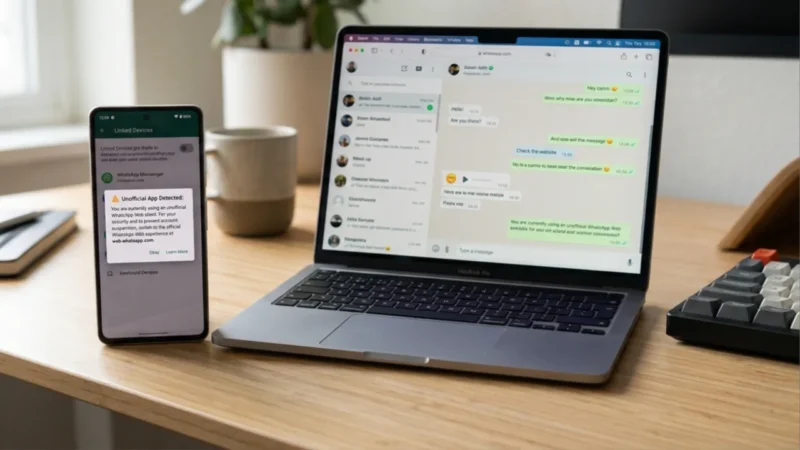
WhatsApp may soon add another security layer for users who access their accounts through third-party or unofficial Web clients.
The messaging platform is reportedly testing a new warning that could appear inside the Linked Devices section of WhatsApp. The alert would encourage users to switch to the official WhatsApp Web experience if they are connected through an unofficial client.
While the feature is still under development, it could become an important privacy and security measure for people who use WhatsApp on computers through third-party tools.
Alsol read: Samsung Galaxy S26 FE Launching Today: Expected Price, Specs, AI Features and What to Expect
WhatsApp May Warn About Unofficial Web Clients
According to reports, WhatsApp is testing the warning with some users running a recent Android beta version.
The warning is expected to appear in the Linked Devices section, where users can normally see computers and other devices connected to their WhatsApp account.
Instead of simply listing the connected device, WhatsApp could display a message informing users that they are using an unofficial Web client and recommending the official WhatsApp Web service.
Users may still be able to dismiss the warning. However, the alert could continue to appear until they move back to the official Web client.
Why Is WhatsApp Doing This?
The main reason appears to be security.
WhatsApp Web is designed to provide access to messages and other account features through an official browser-based experience. Third-party clients and browser extensions may work differently and could potentially introduce additional privacy or security risks.
For example, an unofficial client may request permissions that are not required by the official WhatsApp Web platform. Depending on how such software is built, users could unknowingly expose account information or other sensitive data.
That does not mean every third-party WhatsApp client is automatically malicious. However, WhatsApp has much less control over software developed outside its official ecosystem.
The new warning would give users a simple reminder to check what they are using to access their account.
What Does This Mean for Your Privacy?
For most users, the message is essentially a reminder to stick with the official WhatsApp Web platform.
If you use WhatsApp on your computer through the official website, there should be little to worry about. But if you use a third-party WhatsApp client, browser extension or another unofficial tool, the warning could be a good reason to review what software has access to your account.
Third-party tools can sometimes offer extra features that are not available in the official WhatsApp experience. The trade-off, however, is that users may not always know exactly how those tools handle their data.
When private conversations, photos, documents and other personal information are involved, using an official client is generally the safer choice.
How to Check Your Linked Devices
WhatsApp already provides a way to review devices connected to your account.
Open WhatsApp on your phone and go to Settings > Linked Devices. Depending on your version of WhatsApp, you can see the devices currently connected to your account along with their activity information.
If you notice a device or session that you do not recognize, you should remove it immediately.
It is also worth checking this section occasionally, even if you have not received any warning. An unfamiliar linked device can be a sign that someone else has gained access to your account.
Could Unofficial Clients Become More Difficult to Use?
Possibly.
The current warning is reportedly only a security reminder rather than a complete block. That means users may still be able to access WhatsApp through an unofficial Web client for now.
However, the move suggests that WhatsApp is becoming more proactive about directing users toward its official platforms.
If WhatsApp eventually expands the feature, it could make unofficial clients less convenient by repeatedly reminding users to switch to the official Web experience.
There is no confirmation that WhatsApp plans to completely block every unofficial client.
WhatsApp Is Increasing Its Focus on Security
This isn’t the first time WhatsApp has introduced features aimed at protecting users from potentially dangerous activity.
The company has increasingly added security warnings, privacy controls and anti-scam measures as messaging-based scams become more common.
Unofficial applications can make this problem more complicated because users may not always know whether the software they are installing is trustworthy.
A warning inside WhatsApp could therefore serve as an early line of defense, especially for people who may have installed a third-party Web client without realizing the potential risks.
What Should WhatsApp Users Do?
If you currently use the official WhatsApp Web platform, there is nothing specific you need to change.
If you rely on an unofficial client, browser extension or third-party tool to access WhatsApp, it is worth checking whether you actually need it.
The safest option is to use WhatsApp’s official Web experience and regularly review Linked Devices on your phone.
You should also avoid installing WhatsApp clients from unknown websites or giving unnecessary permissions to browser extensions that interact with your account.
When Will the Warning Roll Out?
The feature is reportedly still under development, so WhatsApp has not confirmed when it will become available to everyone.
As with many WhatsApp beta features, testing does not necessarily mean that the feature will immediately reach all users. WhatsApp could also change how the warning works before a wider rollout.
For now, the important takeaway is simple: if WhatsApp starts warning you about an unofficial Web client, don’t ignore it. Check which client you are using and consider switching to the official WhatsApp Web platform.
For a service that handles personal conversations, photos, documents and other sensitive information, using trusted software is one of the easiest ways to reduce unnecessary privacy risks.
Final Thought
WhatsApp’s upcoming warning for unofficial Web clients could be a small change, but it highlights an important privacy issue that many users overlook. Third-party clients and browser extensions may offer extra features, but they can also introduce risks that are difficult for users to identify.
For now, the safest approach is simple: use the official WhatsApp Web experience, keep an eye on your Linked Devices, and avoid software that modifies or replaces WhatsApp’s official interface. The warning is still under development, so it remains to be seen how widely WhatsApp will roll it out.