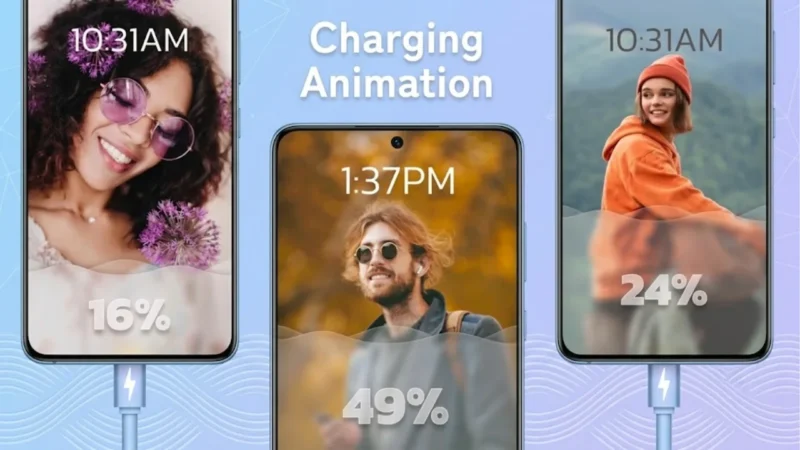
Smartphone customization has evolved far beyond wallpapers and icon packs. Today, Android users can personalize nearly every part of their device experience, including the charging screen. If you’re looking for a simple way to make your phone look more stylish whenever it’s plugged in, charging animation apps can add a fresh visual touch to your device.
One app that has gained attention among Android customization enthusiasts is Battery Charging Animation 4K, which offers a collection of animated charging effects, colorful themes, and battery-related information designed to enhance the charging experience.
Also read: Zipper Lock Screen: Customize Your Android Lock Screen With Stylish Themes and 4D Wallpapers
Why Customize Your Charging Screen?
Most Android devices display a basic charging interface when connected to a power source. While functional, it often lacks personalization and visual appeal.
Charging animation apps allow users to replace the standard charging screen with creative visual effects, helping make the device feel more unique and personalized.
Some users enjoy customization purely for aesthetics, while others appreciate having useful battery information displayed in an easy-to-read format.
What Is Battery Charging Animation 4K?
Battery Charging Animation 4K is an Android customization app designed to display animated charging effects whenever a device is connected to a charger.
Instead of showing a simple battery icon, the app presents dynamic visual themes and animations that can make the charging process feel more engaging.
The app is primarily aimed at users who enjoy personalizing their Android devices and experimenting with different visual styles.
Features That Make It Stand Out
1. High-Quality Charging Animations
One of the biggest highlights of the app is its collection of animated charging effects. These animations are designed to provide a more modern and visually appealing charging experience.
Users can explore different styles based on their preferences and switch between themes whenever they want.
2. Multiple Theme Categories
The app includes various charging screen designs inspired by modern visual trends.
Common theme categories may include:
- Neon-style effects
- Colorful RGB-inspired designs
- Futuristic visual themes
- Energy-flow animations
- Minimalistic charging screens
- Tech-inspired effects
This variety allows users to choose a design that matches their device setup.
3. Battery Information Display
Beyond visual customization, the app can also display useful battery-related details during charging.
Depending on device compatibility, information may include:
- Battery percentage
- Charging status
- Battery temperature
- Charging progress
- Battery health information
Having these details available on-screen can help users quickly monitor their device while charging.
4. User-Friendly Interface
Customization apps are most enjoyable when they are easy to use. Battery Charging Animation 4K offers a simple interface that allows users to browse themes, preview animations, and apply their preferred charging effects without complicated setup steps.
5. Lightweight Experience
Many Android users worry about customization apps slowing down their devices. Modern charging animation apps are generally designed to work efficiently while providing smooth visual effects on a wide range of smartphones.
Benefits of Using Charging Animation Apps
Improved Visual Appeal
A customized charging screen can make a smartphone feel more modern and unique compared to the default charging interface.
Better Personalization
Android users often enjoy creating a device experience that reflects their style. Charging animations add another layer of customization beyond wallpapers and widgets.
Quick Access to Battery Information
Displaying charging details directly on the screen can help users monitor battery status without opening additional menus.
Fun User Experience
Animated charging effects can simply make everyday smartphone use more enjoyable.
Who Might Enjoy These Apps?
Charging animation apps are particularly popular among:
- Android customization enthusiasts
- Smartphone users who enjoy personalization
- Mobile content creators
- Tech lovers
- Gamers
- Users who frequently showcase their device setups on social media
Tips Before Installing Any Charging Animation App
Before downloading any customization app, consider the following:
- Install apps only from trusted sources.
- Review app permissions carefully.
- Check recent user ratings and reviews.
- Keep the application updated.
- Disable features you do not need to improve efficiency.
These simple steps can help ensure a better overall experience.
How to Get Started
Getting started is straightforward:
- Download the app from the Google Play Store.
- Open the application.
- Review and grant required permissions.
- Browse available themes and animations.
- Select your preferred charging effect.
- Enable the charging screen feature.
Once configured, the selected animation will appear whenever the device is connected to a charger.
Also read: Transform Your Android Experience with GO Launcher S: Themes, Wallpapers, and Powerful Customization
Download Battery Charging Animation 4K
If you’d like to explore the app, you can download Battery Charging Animation 4K from the Google Play Store.
Google Play Store (Optional):
https://play.google.com/store/apps/details?id=free.charginganimation.chargingshow.batterycharging.animationeffects.lockscreen.batteryinfo
Alternatively, you can search for “Battery Charging Animation 4K” directly in the Google Play Store.
Final Thoughts
Android’s flexibility makes customization one of its biggest strengths, and charging screen personalization is another way users can make their devices feel unique. Apps like Battery Charging Animation 4K offer animated charging effects, visual themes, and battery information in a simple package that can enhance the overall smartphone experience.
If you enjoy customizing your Android device and experimenting with new visual styles, exploring charging animation apps can be an easy way to give your phone a fresh and modern look.