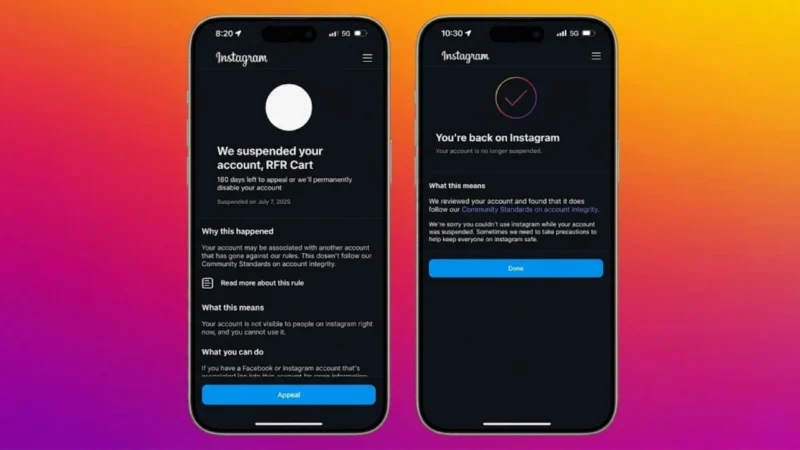
Losing access to an Instagram account can be stressful, especially if the account contains personal memories, business pages, clients, or years of content. Recently, many users reported sudden suspensions and bans without clear explanations, leaving creators and businesses frustrated.
The good news is that many accounts can still be recovered if you follow the correct official recovery process and avoid common mistakes that make the situation worse.
This guide explains how to recover a suspended or banned Instagram account safely using Meta’s official methods.
Also read: WhatsApp Makes New Messages Disappear After They’re Read: WhatsApp after reading feature
Why Instagram Suspends Accounts
Instagram uses automated systems to detect suspicious activity and policy violations.
Common reasons for suspension include:
- Spam-like behavior
- Mass following or mass liking
- Repetitive comments
- Use of unsafe third-party apps
- Login attempts from unusual locations
- Fake engagement or bots
- Community guideline violations
Sometimes, genuine accounts also get flagged accidentally.
Step 1: Try Logging Into Instagram Normally
The first thing you should do is attempt to log in normally.
If your account is suspended, Instagram may show messages such as:
- “Your account has been disabled”
- “We suspended your account”
- “Take action”
- “Appeal this decision”
Carefully follow the instructions shown on-screen.
Do not rush through the process or submit random information.
Step 2: Submit an Official Appeal
If Instagram gives you an appeal option:
- Tap “Appeal” or “Learn More”
- Submit the requested form
- Explain the situation honestly
- Avoid emotional or aggressive language
If your account was suspended by mistake, the appeal process is often the safest recovery method.
Step 3: Complete Identity Verification Properly
Instagram may request:
- A selfie video verification
- Government-issued ID
- Identity confirmation photos
Important tips:
- Use real information only
- Upload clear photos
- Avoid editing documents
- Ensure the account name matches your identity when possible
Incorrect submissions often delay recovery.
Step 4: Check Email and Spam Folders Regularly
Recovery instructions are usually sent through your registered email address.
Check:
- Inbox
- Spam folder
- Promotions tab
- Junk folder
Many users miss important recovery links because they expire quickly.
Step 5: Use Meta’s Official Recovery Channels
Meta Help Center also provides official recovery support for disabled or hacked accounts.
This method is safer than:
- Fake recovery agents
- Telegram “Instagram experts”
- Paid hackers
- Unofficial recovery services
Most “recovery experts” online are scams.
Step 6: Stop Repeated Login Attempts
One of the biggest mistakes users make is panicking.
They:
- Try logging in repeatedly
- Switch between devices constantly
- Use VPNs
- Spam recovery forms
This can increase Instagram’s security suspicion.
Instead:
- Stay patient
- Use one trusted device
- Use your normal network connection
- Follow official instructions carefully
Step 7: Remove Unsafe Third-Party Apps
Many account suspensions are linked to unsafe automation tools.
Examples include:
- Fake follower apps
- Auto-like bots
- Unofficial analytics tools
- Mass DM software
Remove every suspicious connected app immediately.
You can review connected apps through:
- Instagram settings
- Facebook account center
- Meta security settings
Common Instagram Mistakes That Trigger Suspensions
1. Mass Following and Unfollowing
Rapid following behavior looks automated to Instagram.
Avoid:
- Following hundreds of accounts daily
- Aggressive unfollow strategies
- Sudden activity spikes
2. Repetitive Comments
Posting the same comment repeatedly across multiple posts is a major spam signal.
Even manual comments can trigger restrictions if repeated too frequently.
3. Using Instagram Bots
Bots are one of the fastest ways to damage an account.
Instagram can detect:
- Automated likes
- Auto-comments
- Fake engagement
- Artificial growth patterns
Cheap growth tools usually hurt accounts long-term.
4. Sending Spam DMs
Repeated promotional messages can trigger restrictions quickly.
Avoid:
- Copy-paste promotions
- Unwanted outreach
- Aggressive selling in DMs
Organic engagement works better.
Content That Can Get Accounts Suspended
Instagram also enforces strict content policies.
Avoid posting:
- Violence or harmful content
- Hate speech
- Harassment or threats
- Explicit adult material
- Copyrighted content without permission
- Fake financial schemes
- Misleading crypto promotions
Repeated violations increase permanent ban risk.
How to Protect Your Account After Recovery
Once your account returns, secure it immediately.
Enable Two-Factor Authentication
This adds an extra security layer against hacking.
Use:
- Authenticator apps
- SMS verification
- Backup recovery codes
Change Your Password
Use a strong password that:
- Is unique
- Is not reused elsewhere
- Includes letters, numbers, and symbols
Avoid Unsafe Growth Strategies
Stop relying on shortcuts.
Focus on:
- Real engagement
- Valuable content
- Consistent posting
- Genuine audience building
Instagram rewards authentic activity far more today than aggressive automation.
Safe Ways to Grow on Instagram
Good long-term growth practices include:
- Creating useful content
- Engaging naturally with followers
- Using approved Meta tools
- Building niche communities
- Posting consistently
- Avoiding fake engagement entirely
Organic growth is slower, but it’s far safer and more sustainable.
Important Reality Check
Some banned accounts cannot be recovered.
If Instagram permanently removes an account for severe violations, recovery may not happen even after appeals.
Anyone promising:
- Guaranteed recovery
- Instant unban
- “Inside Meta access”
- Paid recovery tricks
is usually trying to scam desperate users.
Also read: Apple May Bring AI Agents to the App Store as Siri Strategy Faces Developer Resistance
Final Thoughts
Recovering a suspended Instagram account requires patience, accurate information, and official recovery methods. The safest approach is always to work directly through Instagram and Meta’s support systems.
But here’s the truth:
Most account suspensions are avoidable. Unsafe automation, fake engagement, spam activity, and risky third-party tools create the biggest problems. Shortcuts may grow an account temporarily, but they also dramatically increase the risk of losing it completely.
If you want long-term stability on Instagram, focus on trust, consistency, and genuine engagement instead of trying to game the platform.